
Here’s what most developers think when they hear “C++ in Godot”: build a GDExtension library, expose a few classes, call them from GDScript. Performance boost achieved, move on.
That’s not wrong. But it’s also not the full story.
C++ can power your entire game logic layer. Not just hot paths. Not just “the slow bits”. The whole thing. With full access to Godot’s internal API, native performance, and proper IDE support for code completion, refactoring, and debugging. And if you go deep enough, you can bypass the scene tree entirely and work directly with the engine’s server architecture.
This is the first article in a series where I’ll show you exactly how to do that. From the simplest approach (custom C++ nodes) all the way to building large-scale simulations on top of Godot’s low-level servers. But before we write any code, let’s talk about why you’d want to, and what becomes possible when you do.
Why use C++ for game logic?
Performance is the obvious answer. And it’s true. Compiling your game logic to native code eliminates interpreter overhead, which matters for CPU-intensive tasks: pathfinding, AI decision trees, physics simulations, procedural generation. The kind of stuff that makes GDScript sweat.
But performance is only the beginning.
Using C++ gives you access to the complete engine API. Not the subset exposed through GDScript bindings. The actual internal API that Godot itself uses. Every server, every low-level call, every optimization path the engine offers. It’s all there, waiting.
You also get the entire C and C++ ecosystem at your fingertips. Want an Entity-Component-System architecture? FLECS or EnTT. Need a debug UI that doesn’t slow your editor to a crawl? ImGui. Networking, serialization, machine learning, audio processing. If there’s a C++ library for it (and there usually is), you can bring it into your Godot project as a first-class citizen.
And then there’s LibGodot, introduced in Godot 4.6. This lets you embed the entire Godot engine as a shared library inside your own applications. Which means programmatic control over engine startup and the main loop. You’re no longer building a game in Godot. You’re building an application with Godot.
Think about what that enables: custom editors with 3D viewports, CAD tools, simulation platforms, hybrid applications where Godot powers the rendering layer inside a larger system. Combine that with the AccessKit-based screen reader support from Godot 4.5, and suddenly Godot becomes compelling for educational tools, accessible interfaces, and interactive visualizations that have nothing to do with games.
That’s the real story. Performance is nice. But access to the full engine? That’s where things get interesting.
Why not use C++ for game logic?
Let’s be honest about the costs.
C++ is a more complex language than GDScript. Compile times are longer. Debugging memory issues is harder. The feedback loop slows down: write code, compile, link, run, test. It’s not instant like GDScript’s hot-reload magic. You need a build system, dependency management, platform-specific toolchains. It’s more setup, more moving parts, more ways for things to break.
For rapid prototyping, GDScript wins. Change a script, the editor hot-reloads it, you see the result immediately. That iteration speed is invaluable during early development when you’re still figuring out what the game even is.
So the question isn’t “should I use C++ or GDScript?” It’s “where does each one shine?”
The sweet spot: combining GDScript and C++
The most effective approach is to use both languages where they’re strongest. It’s a separation of concerns:
- C++ for the engine layer: core game logic, performance-critical systems, data-heavy operations, anything that needs to run at scale. Tech leads, engine programmers, and architects live here.
- GDScript for the gameplay layer: visualization, UI, gameplay scripting, rapid iteration, anything that benefits from tight editor integration. Designers, artists, and gameplay programmers thrive here.
This separation has practical benefits beyond raw performance.
Team scalability. Anyone familiar with Godot can contribute to the GDScript layer without needing to understand the C++ underneath. You could bring on external collaborators or ramp up a team through Patreon or Kickstarter, and they’d be productive immediately. The C++ is invisible to them unless they need to look under the hood.
Portability. Keeping core mechanics in pure C++ makes porting significantly easier. The logic layer can be reused across platforms with minimal changes, while the presentation layer adapts to each target’s requirements.
Testability. Core logic in C++ can be unit-tested independently of Godot’s runtime, using standard C++ testing frameworks. No need to spin up the editor or a game instance just to validate your simulation logic.
Here’s the pattern: use C++ where it genuinely matters (performance-critical systems, large-scale simulations, engine-level architecture), and lean on GDScript for everything else. You get the speed of native code and the flexibility of Godot’s editor. You don’t have to choose.
Two approaches to C++ game logic in Godot
Approach 1: Working within the node system
The simplest path is to write your C++ classes as custom nodes and use them within Godot’s scene tree exactly as you would with GDScript. You register your classes, attach them to scenes in the editor, connect signals. It just works.
This is one of the design decisions I appreciate most about Godot. The node and scene system is powerful enough to build entire games. And using C++ within it gives you native performance while preserving everything the editor offers: the inspector, the scene hierarchy, visual debugging, the entire workflow that makes Godot productive.
Anyone on the team who knows Godot can open the project and understand the structure immediately. The C++ is invisible unless they need to look under the hood. For most projects, this approach covers everything you need.
We’ll explore this in depth in the next article, with a hands-on example.
Approach 2: Going below the scene tree (and this is where it gets wild)
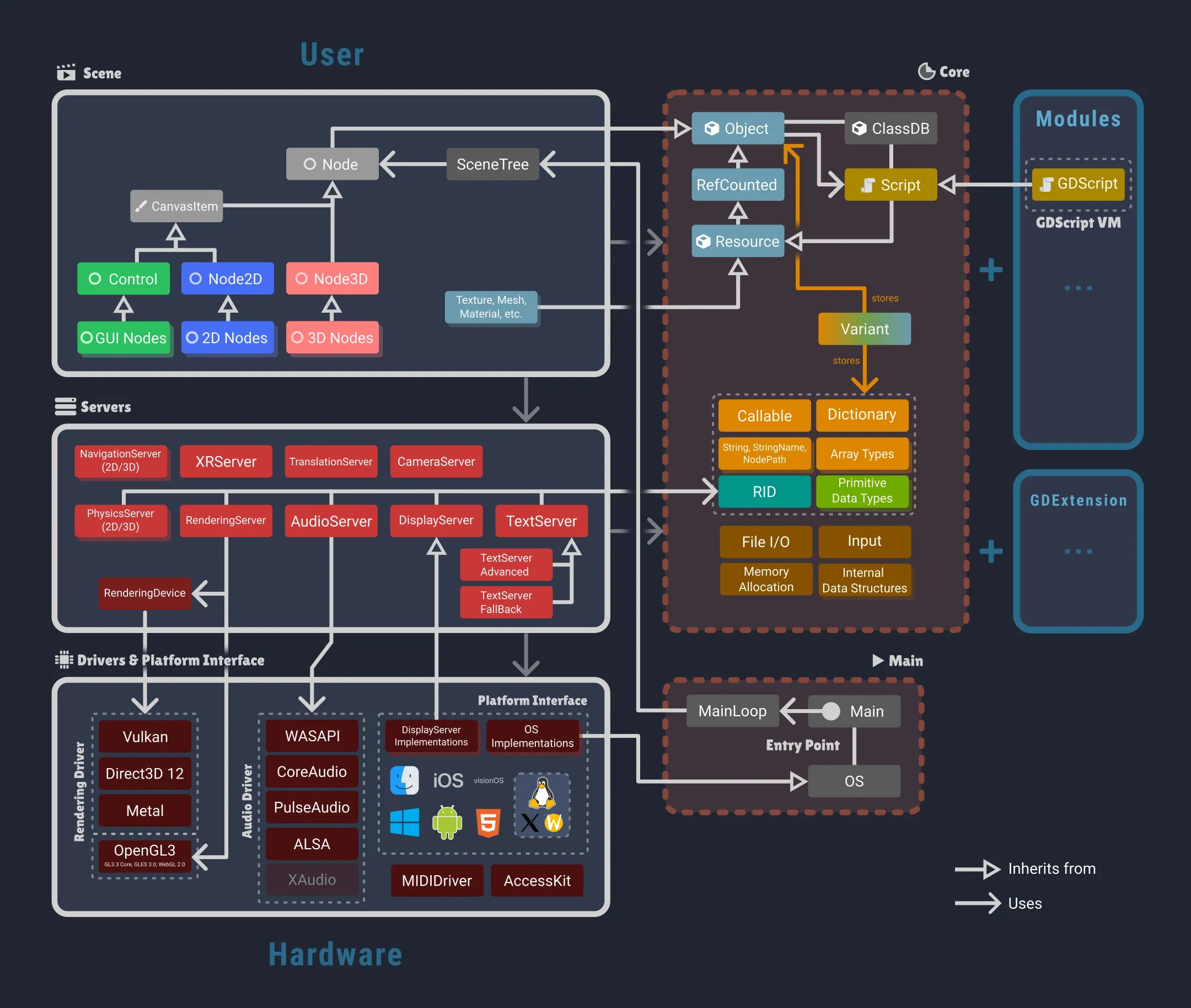
When I first started digging into Godot’s architecture, I expected to find what most game engines give you: a scene graph with some optimization tricks and maybe a few extension points. That’s not what I found.
What I found was this: the scene tree is optional.
Let me say that again. The entire node-based scene system that defines “how you use Godot”? It’s a convenience layer. Underneath it sits a collection of low-level Server singletons that do the actual work. RenderingServer. PhysicsServer3D. AudioServer. NavigationServer. These are the real workhorses of the engine.
Every node that renders something, simulates physics, or plays audio? It’s just a thin wrapper around a server call. The scene system is built on top of the servers. You can bypass it entirely if you want.
Here’s the pattern: each server manages its own resources through opaque RIDs (Resource IDs). You allocate a resource, configure it, and the server handles the rest. No nodes. No scene tree overhead. No virtual dispatch chains. Just direct calls to the subsystem you need.
And here’s why that matters.
What you get when you go direct
RenderingServer: Everything visible goes through here. 2D canvas items, 3D meshes, lights, particles, viewports, shaders, materials, environments. When you need to render tens of thousands of instances (foliage, bullets, procedural geometry), bypassing the node layer and working directly with RIDs can dramatically reduce CPU and memory overhead. We’re talking orders of magnitude for large-scale rendering.
PhysicsServer3D / PhysicsServer2D: Physics spaces, shapes, bodies (static, kinematic, rigid), areas, joints. All of it exists independently from the scene tree. For massive physics simulations (destruction systems, large-scale projectiles, cloth), direct server access eliminates the per-node overhead that would otherwise kill your frame rate. And here’s the kicker: these servers have extension classes (PhysicsServer3DExtension, PhysicsServer2DExtension) that let you replace the entire physics backend. That’s exactly how Jolt Physics integrates with Godot.
AudioServer: Audio buses, effects, device routing, low-level mixing. Want custom audio routing? Procedural audio generation? Your own audio middleware layer? It’s all here.
NavigationServer3D / NavigationServer2D: Navigation maps, regions, pathfinding, collision avoidance agents. You define traversable regions via navigation meshes or polygons, and the server calculates paths and avoidance velocities. Essential for custom AI navigation, dynamic obstacle handling, or server-authoritative pathfinding in multiplayer games.
DisplayServer: Low-level window management, clipboard access, cursor control, input methods. And since Godot 4.5, the accessibility API lives here. A single OS can support multiple display servers, which is why this is separated from the OS singleton.
TextServer: Font management and text rendering, including complex text layout with bidirectional support and text shaping via HarfBuzz. Godot ships two implementations: a built-in fallback and a full ICU/HarfBuzz-based one for international text support.
XRServer: The core of Godot’s AR/VR system. XR interfaces, trackers (headsets, controllers, hand tracking), spatial calibration, coordinate transformations. All accessible.
CameraServer: External camera devices (webcams, phone cameras) for AR applications or video capture.
Why this matters (and why you should care)
In 90% of cases, the standard scene tree will serve you perfectly well. But when you need to spawn and manage tens of thousands of individual entities? A swarm simulation. A city builder with millions of citizens. A bullet-hell with thousands of active projectiles. A particle system that needs to react to physics. That’s when the scene tree becomes the bottleneck.
Each node carries overhead. Memory allocation, virtual dispatch, signals, metadata. Multiply that by 10,000 entities and suddenly you’re spending more time managing the scene graph than running your actual game logic.
Direct server access changes the equation. You write your logic in C++, manage your own data structures (perhaps using an ECS pattern with FLECS or EnTT), and call the servers directly for rendering, physics, and audio. You skip the upper layers entirely. The performance gains are significant. We’re talking about going from “this scene tree update is tanking my frame rate” to “wait, I can spawn how many entities?”
The tradeoff? You give up some of the conveniences the editor provides. No inspector. No visual scene hierarchy. You’re managing resources manually. But for large-scale simulations, that’s a trade worth making.
And here’s the beautiful part: you can mix both approaches. Use the scene tree for your UI, your game state management, your player controller. Use direct server calls for the 50,000 grass blades that need to sway in the wind, or the 10,000 zombies that need pathfinding and collision detection. Godot doesn’t force you to pick one.
We’ll go deep into this later in the series, with a practical example of building a large-scale simulation using direct server calls and an ECS architecture. It’s going to be fun.
What’s next in this series
This article was about the why and the what. The rest of the series is about the how.
Part 2: Hands-on with C++ nodes. Setting up a project, registering custom node types, building game logic within the scene tree. We’ll start simple and build something you can actually use.
Part 3: Direct server access. Bypassing the scene tree for high-performance rendering and physics. This is where we push Godot to see what it can really do.
Part 4: ECS meets Godot. Integrating FLECS or EnTT with Godot’s servers for large-scale simulations. Tens of thousands of entities, minimal overhead, full control.
If you’re coming from a web 3D background, you might also enjoy my Three.js tutorial for building browser-based 3D experiences, which covers similar rendering concepts in a web context.
Don’t miss the next parts
This series builds on itself. Part 2 assumes you’ve read this foundation. To get notified when each article drops:
- Subscribe via RSS to add this blog to your feed reader
- Follow @alexmorcillo82 on X where I’ll announce each part
Have questions or want to share what you’re building with C++ in Godot? Reach out on X or LinkedIn. I read everything.