
I ship more in a day now than I used to ship in two weeks. The code is cleaner, the edge cases are covered, and I catch architectural issues before they hit production.
I’ve been using AI extensively for a year now, both professionally and for personal projects. I started by copying and pasting code back and forth with chat interfaces. Today, I run multi-agent plans for large-scale refactors, architectural updates, and complex features. I’m genuinely moving faster.
Then I read the METR study.
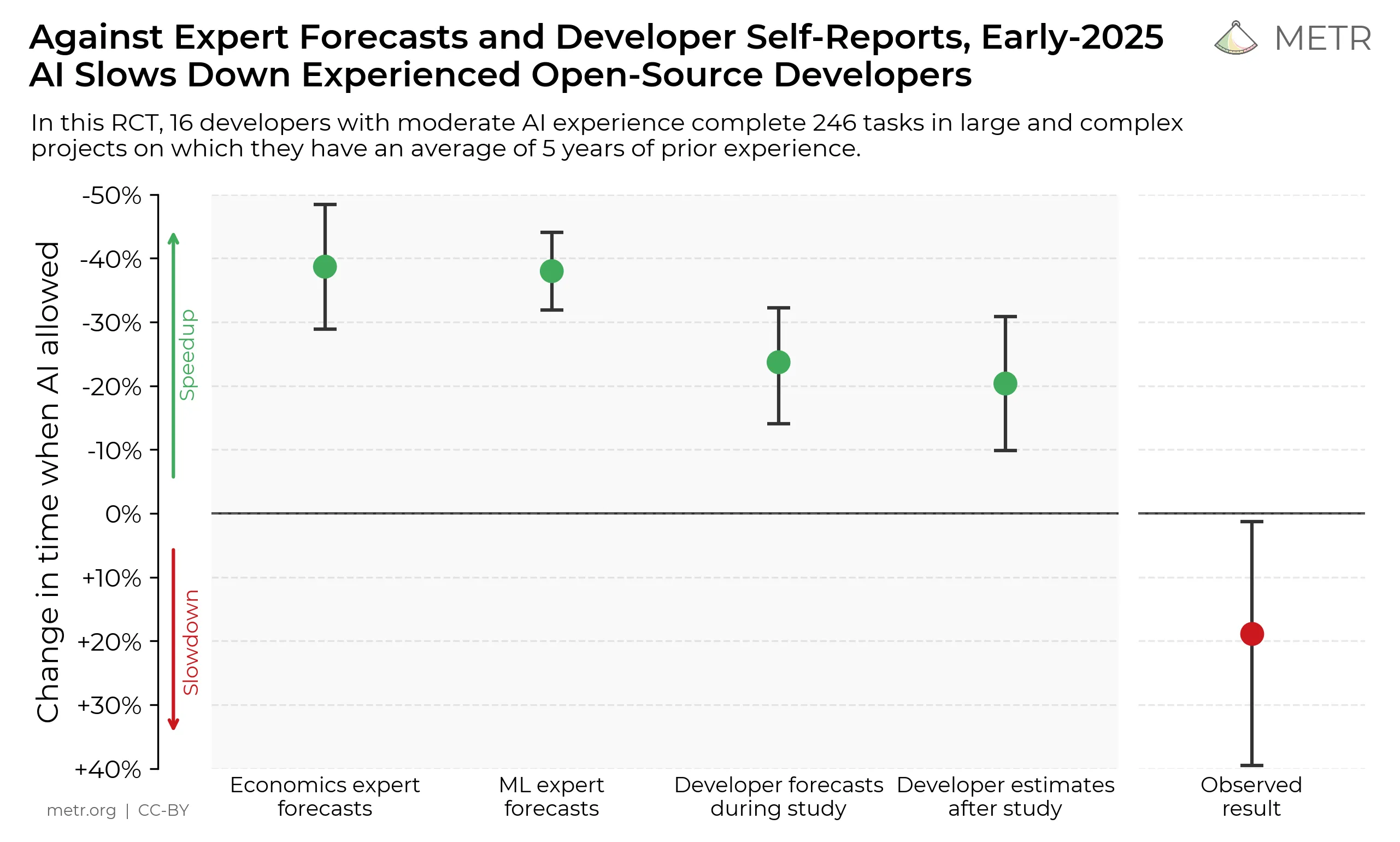
In July 2025, researchers ran a rigorous randomized controlled trial with 16 experienced open-source developers. The kind of engineers who maintain repositories with 22,000+ stars. They were given 246 real GitHub issues. Half got AI tools like Cursor Pro with Claude 3.5 Sonnet. Half worked without AI.
The result? Developers with AI tools took 19% longer to complete tasks.
The kicker: they believed they were 20% faster.
I’m either an outlier, delusional, or the studies are measuring the wrong thing. I think it’s the third one, and understanding why matters if you’re trying to figure out whether AI coding tools actually make you better or just make you feel better.
TL;DR: AI tools slow you down when you use them as autocomplete for tasks you already know how to do. They speed you up when you use them as a collaborator — with proper specs, plans, and context — to tackle harder problems and sustain a higher quality bar.
The Gap Between Studies and Reality
Here’s what makes the METR findings so unsettling. This wasn’t a sloppy survey. The methodology was airtight:
- 16 experienced developers, not bootcamp graduates or hobbyists
- 246 real GitHub issues across bug fixes, features, and refactors
- Average task duration: two hours
- Compensation: $150/hour (enough to ensure serious effort)
- Randomized assignment to AI-allowed vs. AI-prohibited conditions
These developers expected AI would accelerate their work by 24%. After experiencing the slowdown, they still believed AI had sped them up by 20%. The perception gap is massive.
So what’s happening?
The study doesn’t say you shouldn’t use AI. It says something more specific and more interesting: experienced developers working in familiar codebases slow down when they add AI tools to their workflow.
That qualifier matters. Because when I’m productive with AI, I’m rarely working in a familiar codebase on a well-understood problem. I’m prototyping something new, exploring an unfamiliar domain, or scaffolding architecture I’ll refine later. The context is completely different.
When AI Coding Tools Make You Slower
Let me be clear: AI absolutely can make you slower. I’ve watched it happen to myself and others. Here’s when:
You already have the mental model
When you’re debugging your own recent code, you know what you meant to do. Reading and verifying AI-generated fixes takes longer than just fixing it yourself. The cognitive overhead of explaining the problem to an AI, evaluating the proposed solution, and verifying it doesn’t introduce new issues often exceeds the cost of just patching the bug.
The domain is already in your muscle memory
If you’ve written authentication middleware five times before, the sixth time is mechanical. You don’t need AI to generate it. You need your fingers to type what your brain already knows. Adding an AI intermediary just adds latency. On top of that, many developers just want to get the job done and don’t spend the right amount of time preparing the prompt or collecting the right context for the AI to be effective.
The AI generates plausible but subtly wrong code
This is the killer. The model produces something that looks right, passes basic tests, and will absolutely fail in production under edge cases you didn’t think to specify. Catching these requires intense scrutiny. You’re not just reading code — you’re reading code while constantly asking “what did the model misunderstand about my intent?”
Supervision cost exceeds production cost
Here’s the thing nobody warns you about: AI generates code faster than you can properly review it. If you’re running multiple AI agents concurrently, the cognitive load of maintaining quality across parallel workstreams is genuinely draining. I wrote about this in depth in “AI Is Not a Tool. It Is Work.” Your System 2 (deliberate, analytical thinking) fatigues. Your System 1 (fast, intuitive pattern-matching) takes over. System 1 is terrible at catching confident-sounding errors. Quality erodes quietly.
The METR study likely captured all of these scenarios. Experienced developers working in familiar repos on typical maintenance issues probably don’t benefit from AI. They benefit from expertise and muscle memory.
When AI Makes You Faster
Here’s where my experience diverges from the study results. I’m faster with AI — not marginally, but dramatically. A feature that six months ago would have taken me two weeks now ships in a single day, well tested, following the architecture I want, with rapid iteration cycles.
So how do I achieve this? By shifting the mindset:
From “AI is a tool that should make me faster at the same tasks” to “AI is a collaborator that expands the range of tasks I can tackle and the quality bar I can sustain.”
AI isn’t just a code generator — it’s a thinking partner. It helps me explore solutions I wouldn’t have thought of, catch edge cases I would have missed, and scaffold complex features faster than I could write them from scratch. But like any brilliant collaborator, it needs context and guidance.
Think about it. Imagine you join a new team and your first task is to implement a feature in a codebase you’ve never seen before. No clarifications. No explanation of what the product is, what the feature does, or why it matters. Just “change this line of code to solve the problem” — and if it doesn’t work, you’re the one to blame. Frustrating, right? That’s how most people use AI. They throw the problem at it and expect a perfect solution. But AI doesn’t understand your product, your users, or your architecture. It only understands the prompt you give it.
When I’m building something new or working in an unfamiliar codebase, AI helps me bootstrap understanding and iterate quickly. When I’m refactoring or adding features to a well-known codebase, I use AI to generate boilerplate or explore alternative implementations, but I don’t rely on it for the core logic.
Why the Studies Miss the Point
The METR study measured task completion time in familiar codebases. That’s valid. It’s also narrow. It was conducted from a tool perspective, not a work perspective. It asked: “Does adding AI tools make developers faster at the same tasks?” The answer was no — if you don’t change your ways of working.
I’m not arguing the study is wrong. I’m arguing it’s measuring the wrong thing if you want to understand whether AI makes developers more effective.
Faster task completion on known problems isn’t the game. The game is: can you solve harder problems, explore more options, catch more errors, and ship higher-quality systems than you could before?
For me, the answer is yes. But only because I’ve learned when to use AI and when to ignore it.
The Skill Nobody Teaches: Knowing When to Use AI
Here’s the uncomfortable truth: most developers are using AI wrong. They’re using it the way they were taught to use Stack Overflow: when stuck, paste in the problem, accept the answer, move on.
That works for Stack Overflow because the answers have been upvoted by thousands of people and tested in production for years. It doesn’t work for AI because the answer is generated on the spot, may be subtly wrong, and has zero validation beyond your own review.
The skill that separates productive AI users from those who slow down is knowing when the tool’s strengths align with the task’s demands.
Specs and context over random code generation. Before asking AI to generate code, I spend time preparing the prompt. I gather relevant documentation, write a clear spec (also using AI), and provide examples. This upfront investment pays off in higher-quality output.
Plan first, parallelize second. I don’t just ask for code. I ask for a plan from a given idea. I break down the problem into subproblems and assign agents to each. This way, I can manage the cognitive load and ensure each agent has a clear purpose.
Build a living memory bank. I use AI agents in batches to create living documentation of the codebase as I work. Not what the developer hopes to have — what the code actually is. This helps me and the AI maintain context across sessions and reduces the risk of hallucinations.
Optimize for AI maintainability over code elegance. The real value is not in code itself — it’s in the ability to articulate the problem, the solution, and the rationale. I generate code that I can easily replace and rewrite. I focus on performance, security, reliability, and AI maintainability. If AI boosts my productivity by 10x but the side effect is a class with fewer comments and methods over 20 lines, so be it. I can always refactor later. The point is to get the value out faster and iterate.
The Real Productivity Gain Isn’t Just Speed
Here’s what I’ve realized after a year of serious AI-assisted development: the productivity gain isn’t just that I ship individual features faster. It’s that I ship better features, explore more options, and catch more mistakes before they become incidents.
See below some of the practices that have made the biggest difference:
-
Every project is fully documented with detailed specifications. This ensures that AI generation is highly replicable and maintainable.
-
Every spec provides strong context: business value, personas, constraints, expectations, acceptance criteria, and edge cases. While creating those specs, I ask AI to generate new scenarios that I carefully review.
-
Architecture and guiding principles are documented upfront. I can ask AI to generate code that follows those principles and to critique code against them, catching deviations early.
-
I generate a coding plan before writing any code. I ask AI to explore approaches, identify pitfalls, and suggest optimizations. I review the plan before any code is generated — an early code review of intent, not implementation. Since I wrote the specs and acceptance criteria, I enforce BDD and TDD practices: tests first, then implementation.
-
I iterate ruthlessly. The first generation is never final. I define clear quality bars for each iteration and enforce them. If the output doesn’t meet the bar, I ask AI to explain what it misunderstood and try again.
The real productivity comes from acting as an orchestrator of AI agents — a leader, a product manager, a software architect — not a typist.
AI coding tools are not making me faster at the tasks I was already good at. They’re expanding the surface area of problems I can tackle and the quality bar I can sustain. That’s a fundamentally different kind of productivity.
Now, my delivery is accompanied by a memory bank documentation that is always versioned together with the code. It captures the rationale, design decisions, edge cases, and testing strategy. I can iterate on the code with much richer context and catch issues before they become incidents.
And very importantly, I can re-execute with new models and see how the code evolves — proving that the value lives in the specs and plans, not in any single generation.
The studies say AI makes developers slower. They’re right — if you use AI the way you used Stack Overflow. They’re wrong if you use it the way you’d onboard a brilliant but context-blind engineer. The difference is everything.
Research for this article was conducted in March 2026. Key sources: METR study on AI developer productivity (July 2025), Anthropic’s partnership with Mozilla on Firefox security analysis (March 2026), and my own lived experience building software with Claude Code, Cursor, and GitHub Copilot over the past year.